# Recollections

Recollections function a little differently than Memories on other sites do. They are essentially souped-up [Lorebooks](https://charsnap.gitbook.io/charsnap/lorebooks#lorebooks) customized for memories within a chat. Memories, which you add to a Recollection, are similar to Lorebook Entries.

{% hint style="info" %}

## <mark style="color:red;">**WARNING: RECOLLECTION BOOKS ARE BOT-SPECIFIC. THEY WILL WORK ON THAT BOT AND ITS VARIANTS, BUT CANNOT BE TRANSFERRED TO ANOTHER BOT.**</mark>

{% endhint %}

You can find Recollections on the righthand panel, as seen here:

<div align="center"><figure><img src="https://4109759949-files.gitbook.io/~/files/v0/b/gitbook-x-prod.appspot.com/o/spaces%2FEwva6JgFuXJcJL38LUDs%2Fuploads%2FSRilvY9ngBAKZKYc14gV%2Fimage.png?alt=media&#x26;token=d433531a-4347-438f-aa2f-fe109303ba04" alt=""><figcaption></figcaption></figure> <figure><img src="https://4109759949-files.gitbook.io/~/files/v0/b/gitbook-x-prod.appspot.com/o/spaces%2FEwva6JgFuXJcJL38LUDs%2Fuploads%2F34P7mZZ31wTv1aApDATe%2FScreenshot%202025-05-18%20223101.png?alt=media&#x26;token=1325d4cd-c954-488a-93d5-5db038c82a93" alt=""><figcaption></figcaption></figure></div>

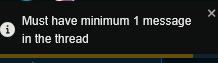
<mark style="color:orange;">**NOTE: In order to use recollections, you need to have sent at least ONE MESSAGE to the bot or variant in question! You will see this message in the upper right if you do not do so:**</mark>

<figure><img src="https://4109759949-files.gitbook.io/~/files/v0/b/gitbook-x-prod.appspot.com/o/spaces%2FEwva6JgFuXJcJL38LUDs%2Fuploads%2FmBkw16IOsTjFuxY5fCme%2Fimage.png?alt=media&#x26;token=1b1060ee-ab94-44e1-a2a9-0f6554dea802" alt=""><figcaption></figcaption></figure>

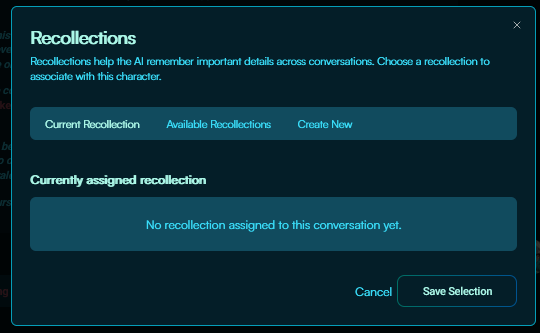
Upon pressing "<mark style="color:purple;">**Manage Recollections**</mark>," the Recollections pane will appear, which has a few tabs on it. Since we currently have no Recollection Books for this bot, let's create one. First, click on "<mark style="color:purple;">**Create New**</mark>."

<figure><img src="https://4109759949-files.gitbook.io/~/files/v0/b/gitbook-x-prod.appspot.com/o/spaces%2FEwva6JgFuXJcJL38LUDs%2Fuploads%2FDTFE2K4Xb5WvG1qVG7KF%2Fimage.png?alt=media&#x26;token=ba7209ba-317d-46bc-9140-2d784fa5a7d0" alt=""><figcaption><p>The Recollections panel</p></figcaption></figure>

<figure><img src="https://4109759949-files.gitbook.io/~/files/v0/b/gitbook-x-prod.appspot.com/o/spaces%2FEwva6JgFuXJcJL38LUDs%2Fuploads%2FaseU7pFHkMoPDctIRVkt%2Fimage.png?alt=media&#x26;token=c4457628-c3f4-4d3b-8c12-334d691ba5de" alt=""><figcaption><p>Creating a new Recollection Book</p></figcaption></figure>

So just as you would a Lorebook, you will give a title to the Recollection Book as a whole, and then go into individual entries, or Memories. You will then name that specific memory, add its trigger tags, and finally, write the memory itself of what happened in the chat. Here's an example:

<figure><img src="https://4109759949-files.gitbook.io/~/files/v0/b/gitbook-x-prod.appspot.com/o/spaces%2FEwva6JgFuXJcJL38LUDs%2Fuploads%2F2wUDIiF0aMYuyKW74BUG%2Fimage.png?alt=media&#x26;token=b0c71dd7-b31c-4963-a303-fd3dff405122" alt=""><figcaption><p>A simple example Memory.</p></figcaption></figure>

"<mark style="color:purple;">**Added Memory Entries**</mark>" functions the same as its Lorebook counterpart — it's a list of all the Memories you've stored in that Recollection Book that can be edited or deleted. Since this is our only Recollection Book, it will be activated by default. The "<mark style="color:purple;">**Available Recollections**</mark>" tab will be empty until you create a second Recollection Book.

<figure><img src="https://4109759949-files.gitbook.io/~/files/v0/b/gitbook-x-prod.appspot.com/o/spaces%2FEwva6JgFuXJcJL38LUDs%2Fuploads%2FcPkanuzMeA8O8YydrCp0%2Fimage.png?alt=media&#x26;token=4c625861-92ae-462a-afb1-443b9fdbe39d" alt=""><figcaption><p>The Current Recollection.</p></figcaption></figure>

You'll follow the same process as above to make your second Recollection Book. Once it's been made, you will see that the new one is the current selection. In order to change which Recollection Book is being used, you'll want to go to the "<mark style="color:purple;">**Available Recollections**</mark>" tab. You can swap it there, and it'll disappear from that list and be shown in the "<mark style="color:purple;">**Current Recollection**</mark>" tab.

<div><figure><img src="https://4109759949-files.gitbook.io/~/files/v0/b/gitbook-x-prod.appspot.com/o/spaces%2FEwva6JgFuXJcJL38LUDs%2Fuploads%2FVx7jh5HrJlyvcWnGPiPS%2Fimage.png?alt=media&#x26;token=050b3f99-1e7d-4e7f-8f7b-5f997b3a5935" alt="" width="442"><figcaption><p>The current Recollection book and its Memories.</p></figcaption></figure> <figure><img src="https://4109759949-files.gitbook.io/~/files/v0/b/gitbook-x-prod.appspot.com/o/spaces%2FEwva6JgFuXJcJL38LUDs%2Fuploads%2FUAYuwzpRqwD14BclLKdg%2FScreenshot%202025-05-19%20013641.png?alt=media&#x26;token=d90c6d92-23be-40d7-829a-fee9c089691e" alt="" width="436"><figcaption><p>Where to select other Recollection Books you've made for this bot.</p></figcaption></figure></div>

{% hint style="info" %}

#### <mark style="background-color:yellow;">A WORD ON TRIGGERS:</mark> if you have a Lorebook and a Recollection Book equipped that have an entry with the same trigger, both entries will be pulled. If they are identical, it will ignore the extra. If they are different, it will take both into consideration.

{% endhint %}

Once you have a Recollection Book equipped, you can then resume chatting as normal, and the entries should show up if triggered. Here is an example of an entry being triggered, the one where Sampo and Gepard went snowboarding:

<figure><img src="https://4109759949-files.gitbook.io/~/files/v0/b/gitbook-x-prod.appspot.com/o/spaces%2FEwva6JgFuXJcJL38LUDs%2Fuploads%2Fz9ifb0SIC19HFRTLS2DJ%2FScreenshot%202025-05-19%20064223.png?alt=media&#x26;token=2294ac30-82e5-4626-b84c-527e0fe4ae56" alt=""><figcaption><p>A Memory triggered using its keyword, "Timberline Lodge."</p></figcaption></figure>

To unequip a Recollection Book, go to the Current Recollection tab, and click "<mark style="color:purple;">**Disconnect Recollection.**</mark>" This will remove it, and you can assign another from the Available Recollections tab if you so desire.

<figure><img src="https://4109759949-files.gitbook.io/~/files/v0/b/gitbook-x-prod.appspot.com/o/spaces%2FEwva6JgFuXJcJL38LUDs%2Fuploads%2Fng7ua56rS2UrNc8CVDle%2Fimage.png?alt=media&#x26;token=e93eba5d-b058-41f4-a695-6fcb46f42921" alt=""><figcaption></figcaption></figure>

{% hint style="info" %}

## <mark style="color:red;">Always On: Be aware that when "Always On" is enabled, the entry will always be used. Be careful, as too many of these</mark> <mark style="color:red;"></mark>*<mark style="color:red;">may</mark>* <mark style="color:red;"></mark><mark style="color:red;">cause issues. Be very sparing and cautious with what you use this for. Using triggers is recommended for most situations.</mark>

{% endhint %}
