> For the complete documentation index, see [llms.txt](https://charsnap.gitbook.io/charsnap/llms.txt). Markdown versions of documentation pages are available by appending `.md` to page URLs; this page is available as [Markdown](https://charsnap.gitbook.io/charsnap/basics-for-everyone/lorebooks.md).

# Attachments

Attachments are add-ons you can put onto your chatbot of choice. They can make help roleplay and chats more immersive by giving them more information to work with.

<figure><img src="/files/eM4jnJJqszsejWa4IMFl" alt=""><figcaption><p>A preview of the different types of attachments.</p></figcaption></figure>

## How to Add Existing Attachments to Your Chat

### Desktop

If you'd like to add an attachment to an existing chat, you want to scroll down on the right side of the hot bar until you see the two options highlighted in red in the bottom right corner. You should see Lorebooks (lorebooks are also an attachment, they just get their separate tab) and Attachments.

<figure><img src="/files/aNYB0Xs2pnqEZZ4XetRC" alt=""><figcaption><p>Where to locate attachments within chat (Desktop)</p></figcaption></figure>

### Mobile

If you want to assign attachments on mobile, you have to click on your character's icon in the top left of the chat to open the menu. See below.

<figure><img src="/files/H1t8TzIILKbc3bpB8rl3" alt="" width="375"><figcaption></figcaption></figure>

<figure><img src="/files/RzrdHbJKOZTn6CObxYgX" alt="" width="300"><figcaption><p>Clicking on the bot icon should present you with this.</p></figcaption></figure>

### Selecting Attachments of Your Choice

Upon selecting "Assign Attachments" you should be greeted by this screen (or something similar on mobile). From here, you should be able to see all of the community's creations, ranging from: System Prompts, Scenarios, and Always Active System Prompts. These attachments append onto what's already in the bot.

<figure><img src="/files/n8vgeXGWU3MuM9iEh5qt" alt=""><figcaption></figcaption></figure>

Clicking on the icon or title of people's attachments will show you the content that they embedded into their entry. Often times, they will also create creator memos at the bottom of the page. It should look like this:

<figure><img src="/files/QYckR6e3QAZSHjZZfuQQ" alt=""><figcaption><p>What it looks like when you preview an attachment.</p></figcaption></figure>

From here you can see the content which tell you exactly how and what the attachment will do to affect your roleplay. In this case, pelele\_laylay's Unadulterated Rage will make your {{char}} super angry! Make sure to read the creator notes beneath the content box, often times creators will include important notices as to what the attachment is intended for!

Once you've finished reading an attachment of your interest, and you've decided you want to add it, make sure to check the box at the top right corner to select it.

<figure><img src="/files/NC6baPJ5V6FaHhNlOIwt" alt="" width="563"><figcaption><p>Checking the box inside the attachment.</p></figcaption></figure>

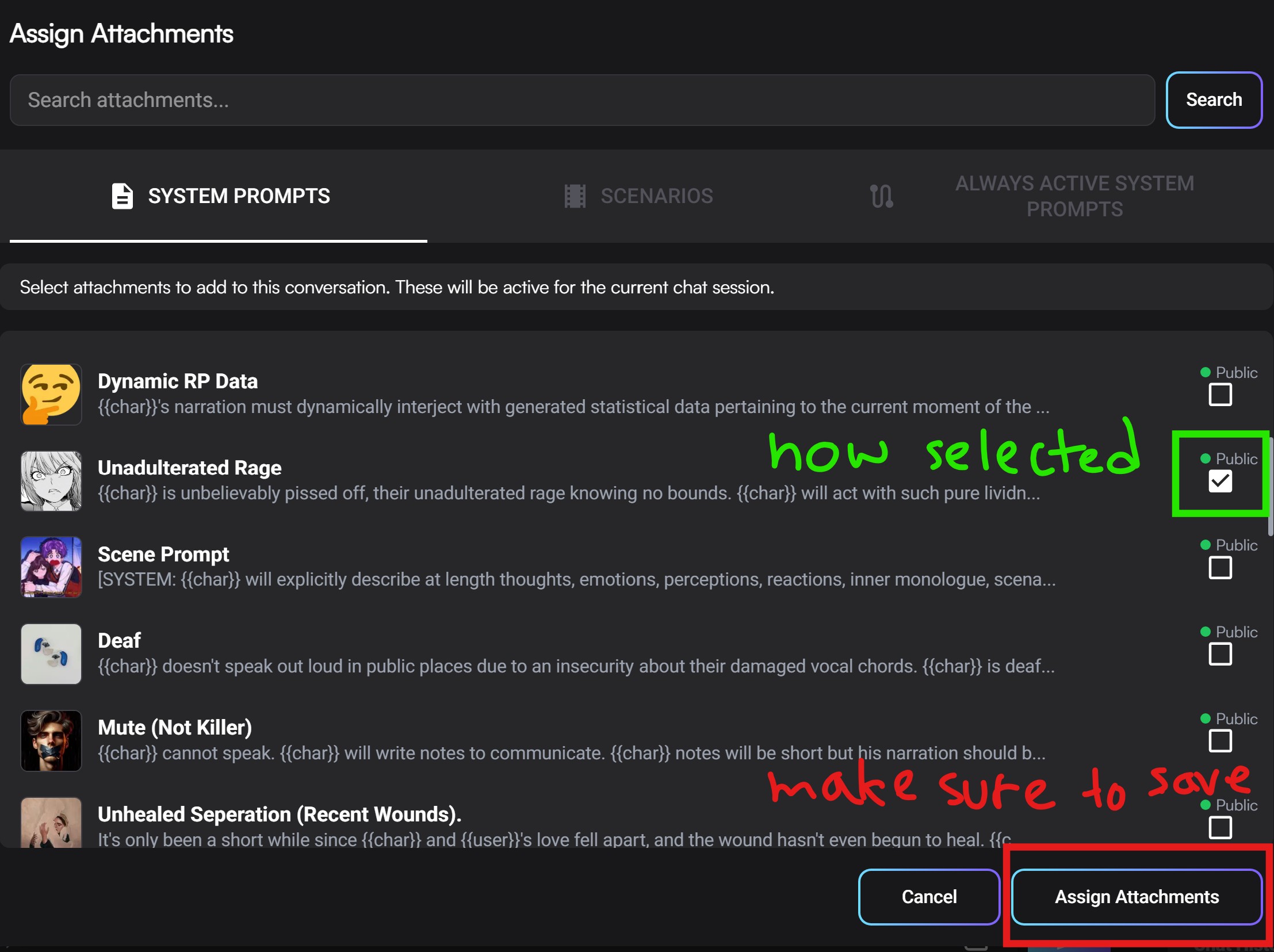
<figure><img src="/files/Hhv8vxJ3kLDtTmcBWNsR" alt="" width="563"><figcaption><p>Checking the box from the assign attachment homepage.</p></figcaption></figure>

Finally selected all the attachments you want to add your chat? Make sure to save at the very bottom by clicking "Assign Attachments."

<figure><img src="/files/l6QIzqivK6B4TV78sA8Q" alt="" width="563"><figcaption><p>Don't forget to save!</p></figcaption></figure>

## Creating an Attachment

<figure><img src="/files/KmDN1FEUku0RT9RKTCof" alt=""><figcaption></figcaption></figure>

You can create an Attachment by going to the Attachment page from the sidebar, and then clicking on the tab of the Attachment you want to make. From there, click the bottom + sign (<mark style="color:red;">in red</mark>). Alternatively, you can click the top + sign (top right corner) and choose what you'd like to create from a menu.

{% hint style="info" %}
No posting ripped (copied) content as Public. If you rip (a.k.a. you are not the original creator) content from another site or put a bunch of public sysprompts together it absolutely MUST stay private. This goes for bots, sysprompt attachments, scenario attachments, and ujb attachments. Repeated offenses will result in a discussion. Posting public Lorebooks from other sites is fine so long as the original creator has not specifically requested otherwise, and making sure that the Lorebook follows all of CharSnap's rules is up to you as the poster.
{% endhint %}

### Lorebooks

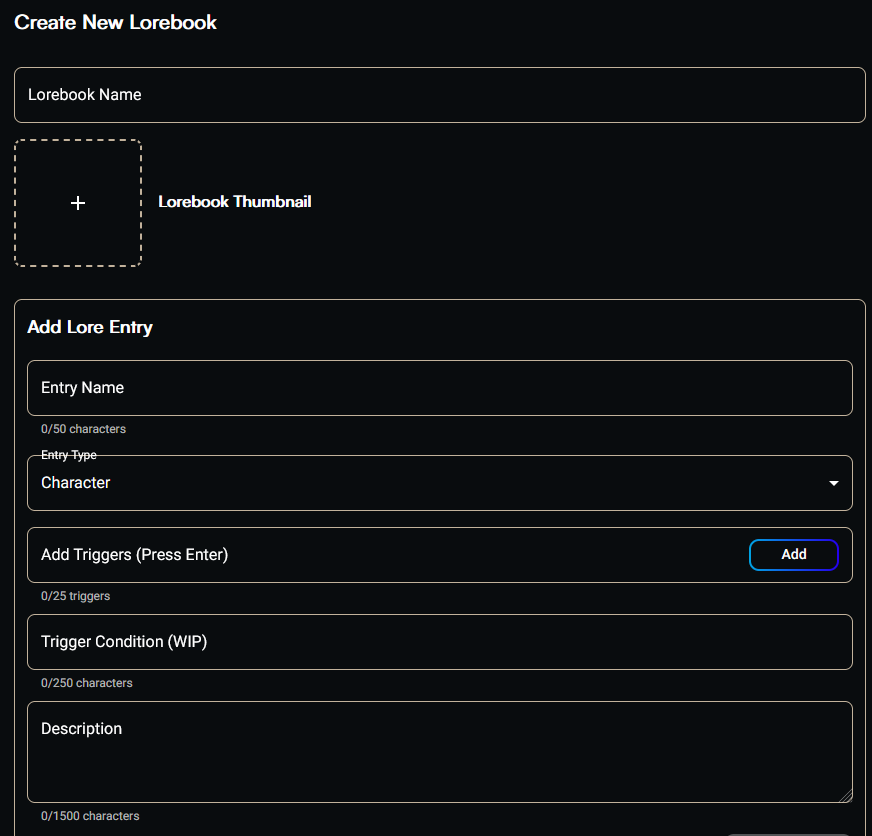
<figure><img src="/files/Ftd8MQp7lLDJtc1Rlv4E" alt=""><figcaption></figcaption></figure>

All Lorebooks must have the Lorebook Name, Entry Name, at least 1 Trigger, and the Description filled out for each entry. Up to 25 entries can be triggered at once per message!

### Entry Name

This is the name of your entry, most helpful for seeing what entry is triggered and finding it again to edit later. The LLM does take this field into account when pulling from the Lorebook, but it doesn't hold high weight.

### Entry Type

This is the category, basically, for this entry. This is set to Character as default, but can be changed to Location, PlotEvent, Item, or Other. The LLM does take this into account when pulling from the Lorebook, but the affect is minimal so don't worry about it too much.

### Triggers

These are the keywords that the LLM is using to decide to pull from the Lorebook. You want these to be words that, when they appear in chat, they call upon this entry for context. The contents of user's last message and char's message before that are used for these triggers to determine char's NEXT response. If the trigger is not used again, the entry will no longer be called. Try not to use the same keywords for more than a handful of entries. Entries only use context memory while they are actively being triggered - once the entry is no longer being triggered, it stops using your context memory.

{% hint style="info" %}
Lorebook trigger logic is:\
Bot Msg (Triggers Entry A)\
User Msg (Triggers Entry B)\
Bot Msg (Uses LB Entry A and B)\
User Msg (Triggers Entry C)\
Bot Msg (Uses LB Entry C + A/B if keywords were used in previous Bot Msg)
{% endhint %}

### Trigger Condition

The Trigger Condition field is currently a WIP, though you can fill it out for when it eventually goes live. "When {{char}} does \[THIS], \[THIS] will happen." "When {{user}} is at home." Stuff like that.

### Description

This is the meat of the entry. Generally, you want to keep this concise. Character limit is 1500 for each entry, but it's recommended to keep it around 500, especially because so many entries can be pulled at one time. Some examples of entries can be: character sheets for NPCs, rules of the universe, setting, creatures/monsters, food/drink, etc. Remember to save when you're done messing with your Lorebook!

{% hint style="info" %}
The tokens for triggered Lorebooks do not stay in context forever! They only stay as long as they're being triggered, then leave. If you're pulling the max 25 entries totally full at 1500 characters each every message, this will be a problem, but generally speaking your context should be fine during roleplay. Just make sure all your entries aren't triggering every message!
{% endhint %}

{% hint style="info" %}
Lorebooks do not currently use a RAG system! If your trigger isn't used, the lorebook entry will not be used.
{% endhint %}

<figure><img src="/files/ZQHVt6wL4IsAVi9Qe8w9" alt=""><figcaption></figcaption></figure>

### Import JSON

You are able to import a JSON, which is helpful for moving Lorebooks from other sites. This uses the same JSON file structure as Chub, with some additional sections for viewable entries, etc, that CharSnap uses. There is a sample JSON here.

{% file src="/files/rt0GSOSOGFC00k6p74T1" %}

{% hint style="info" %}
Please remember that it is up to you as the poster to make sure the Lorebook you're importing is CharSnap safe! No kids or overtly childlike characters, sexualized animals, etc. A Lorebook with a minor issue may get your bot denied, the entry forcibly changed, or the Lorebook deleted. A Lorebook with major infractions involving sexualized kids will likely result in an immediate ban.

There are some popular Chub lorebooks imported and made legal by mods. These have "CS Safe" in the title.
{% endhint %}

<figure><img src="/files/ESV0BIZ8TQzDYco3YKbq" alt=""><figcaption></figcaption></figure>

## Scenarios

This is a way to force a change in a setting, plot, etc.! You can make the world be zombies, or in outer space, or go to Disney! You can also include macros such as {{char}} and {{user}}, give instructions on the first randomly generated message ({{char}} should begin the scene fitting the scenario, by telling {{user}} that they're going to Disney.

## System Prompts

This field is for things you want the AI specifically to do, such as types of narration. At the moment there is no Attachment style for things to go into the Description/Personality fields, so here you will also find stuff such as forcing {{char}} as a demi-human, into the omegaverse, etc.

## Always Active System Prompts

This is the last thing that the LLM takes into account before giving you the message, appended with the bot's native AASP, and so is extremely strong. This is most useful for Utility things such as not speaking for {{user}}, translations, huds, and meters, things that should be taken into account every single message.


---

# Agent Instructions
This documentation is published with GitBook. GitBook is the documentation platform designed so that both humans and AI agents can read, navigate, and reason over technical content effectively. Learn more at gitbook.com.

## Querying This Documentation
If you need additional information that is not directly available in this page, you can query the documentation dynamically by asking a question.

Perform an HTTP GET request on the current page URL with the `ask` query parameter:

```
GET https://charsnap.gitbook.io/charsnap/basics-for-everyone/lorebooks.md?ask=<question>
```

The question should be specific, self-contained, and written in natural language.
The response will contain a direct answer to the question and relevant excerpts and sources from the documentation.

Use this mechanism when the answer is not explicitly present in the current page, you need clarification or additional context, or you want to retrieve related documentation sections.