> For the complete documentation index, see [llms.txt](https://charsnap.gitbook.io/charsnap/llms.txt). Markdown versions of documentation pages are available by appending `.md` to page URLs; this page is available as [Markdown](https://charsnap.gitbook.io/charsnap/basics-for-everyone/my-favourites.md).

# My Favourites

Find all your beloved characters and followed creators here.

## The Place to Find Characters & Creators You Love

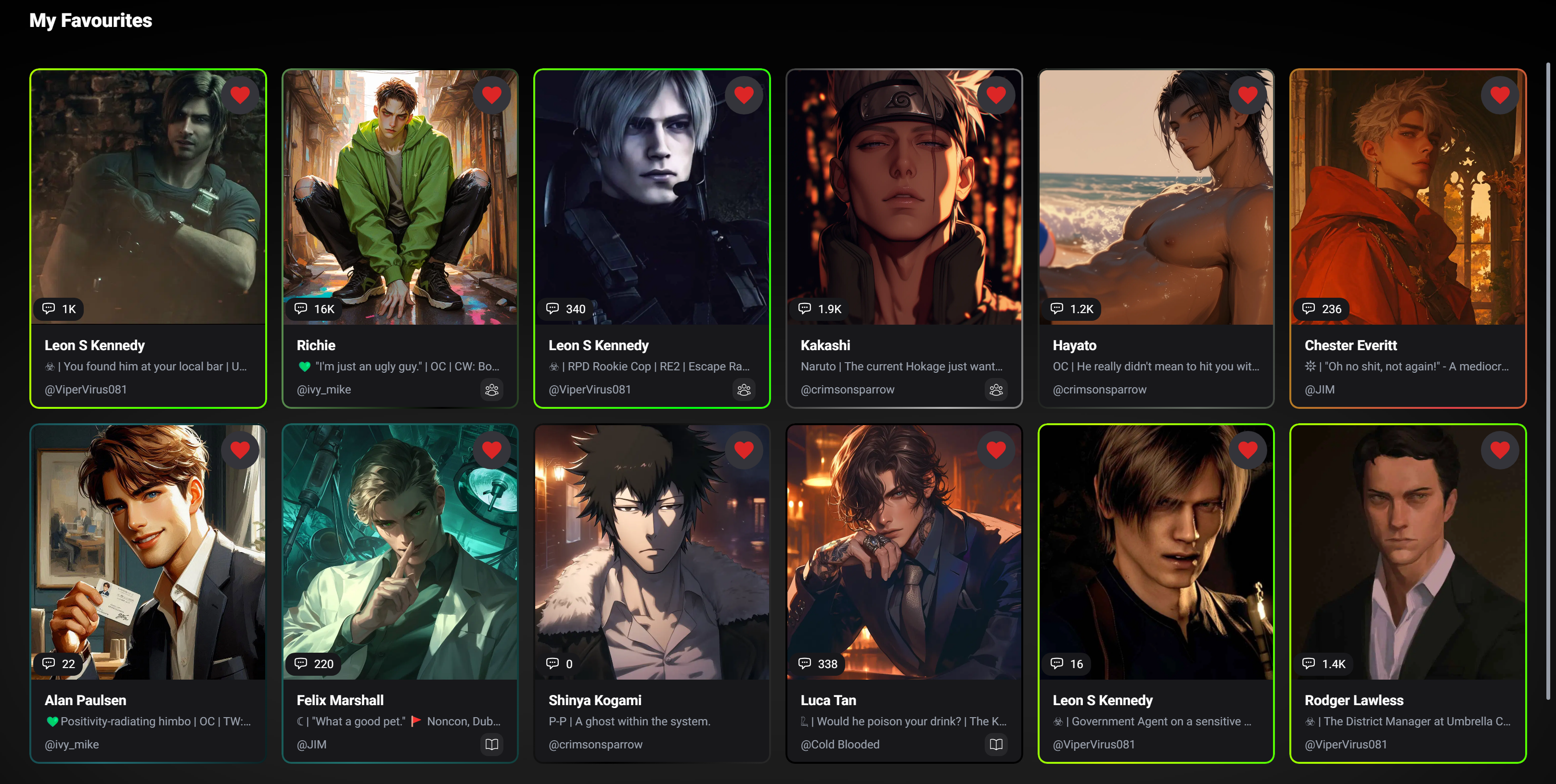
<figure><img src="https://4109759949-files.gitbook.io/~/files/v0/b/gitbook-x-prod.appspot.com/o/spaces%2FEwva6JgFuXJcJL38LUDs%2Fuploads%2Fati1QrGPjbjmDb25iyOi%2FScreenshot%202025-04-22%20120145.png?alt=media&amp;token=4b8489b9-9c56-4ac9-9ed0-e41b73c20f05" alt=""><figcaption><p>Example of what a filled favourites page looks like.</p></figcaption></figure>

In the favourites section, you can find all the bots you hearted/favourited. If you really love or like somebody's bot and want to check them out again later, you can favourite them by clicking on their bot profile and selecting the heart. I suggest checking out [Bot Profile](/charsnap/basics-for-everyone/bot-profile.md) if you want to know more about the different options that come up on the bot's preview page.

<figure><img src="https://4109759949-files.gitbook.io/~/files/v0/b/gitbook-x-prod.appspot.com/o/spaces%2FEwva6JgFuXJcJL38LUDs%2Fuploads%2FhrAU2BQSrcIionPEePI1%2FScreenshot%202025-04-22%20120616.jpg?alt=media&amp;token=35064ae4-6ccb-48bf-8535-1618fe50f3bf" alt=""><figcaption><p>Select this icon to favourite a character!</p></figcaption></figure>

## Following Creators and Their New Releases

<figure><img src="https://4109759949-files.gitbook.io/~/files/v0/b/gitbook-x-prod.appspot.com/o/spaces%2FEwva6JgFuXJcJL38LUDs%2Fuploads%2FIheAurBEl874RK1HYGA2%2Fimage.png?alt=media&amp;token=b4349ab8-b28a-4b6f-abc7-829a7603bf05" alt=""><figcaption><p>Favourites page menu</p></figcaption></figure>

Not only are you able to view your favourited bots, but you're also allowed to view all your followed creators of choice and their new bot releases! Below this text is a preview of what the page looks like under Favourited Creators.

<figure><img src="https://4109759949-files.gitbook.io/~/files/v0/b/gitbook-x-prod.appspot.com/o/spaces%2FEwva6JgFuXJcJL38LUDs%2Fuploads%2F0683CjQxyTBIiADYQ7kI%2Fimage.png?alt=media&amp;token=15734b5d-8af2-499f-ac8a-58c4aecb7ac9" alt=""><figcaption><p>Followed creators preview</p></figcaption></figure>

Next is Creator Bots, in this section it will tell you if any of your followed creators released a new bot (based on recently published). This way, you can stay up to date with quality content of your liking! (See image below for preview).

<figure><img src="https://4109759949-files.gitbook.io/~/files/v0/b/gitbook-x-prod.appspot.com/o/spaces%2FEwva6JgFuXJcJL38LUDs%2Fuploads%2FlCM9Dq1LzxRqFx9pPltt%2Fimage.png?alt=media&amp;token=75d4f24b-aa9f-4ce8-ac13-7633cedb634b" alt=""><figcaption><p>Showcase of Creator Bots - Shows the most recently published bots from your fav creators!</p></figcaption></figure>

As an extra note, you can also view your creators' most recently published bots ON the homepage under "Your Top Characters 🔥" where it will auto scroll through the ten most recently published. Otherwise, it's better to check out your Favourites page if you wanna view more than the most recent ten.&#x20;

<figure><img src="https://4109759949-files.gitbook.io/~/files/v0/b/gitbook-x-prod.appspot.com/o/spaces%2FEwva6JgFuXJcJL38LUDs%2Fuploads%2FCFNTYECuRni24XHOEgkb%2Fimage.png?alt=media&amp;token=b74890fb-0556-49d0-914f-632af481f183" alt=""><figcaption><p>Preview of <a data-mention href="/charsnap/basics-for-everyone/home.md">Home</a> where the top 10 most recently published bots ALSO show up.</p></figcaption></figure>

## Favourite Buckets

Don't worry, we didn't forget. I'm sure you noticed that there's a "Favourite Buckets" section too. We're about to explain.

<figure><img src="https://4109759949-files.gitbook.io/~/files/v0/b/gitbook-x-prod.appspot.com/o/spaces%2FEwva6JgFuXJcJL38LUDs%2Fuploads%2F3gMc9XLJ604WYuQhHbYp%2Fimage.png?alt=media&amp;token=f43665b9-e6ad-4d4d-b61c-a3b10f82d533" alt=""><figcaption><p>Favourite Buckets - What is this?</p></figcaption></figure>

Basically, if you have a lot of favourited/liked characters, it can get super overwhelming to scroll through the page to find them. This is what buckets are for! To organize your favourite characters by folders, click on the "Manage Buckets" button. Once you do, you'll see something like this:

<figure><img src="https://4109759949-files.gitbook.io/~/files/v0/b/gitbook-x-prod.appspot.com/o/spaces%2FEwva6JgFuXJcJL38LUDs%2Fuploads%2FYsIP5o6P8dDo3qHlRQQt%2FScreenshot%202025-05-10%20173403.png?alt=media&amp;token=e18ad137-db68-47b8-995e-d7f30a80c28a" alt=""><figcaption><p>Favorite buckets pop-up screen</p></figcaption></figure>

By default, you will see the "My Buckets" screen. Here, you'll see all the buckets you already created, but if you don't have any yet—don't worry. We're here to make a new one. To create a new bucket you can swap over to the "Create Bucket" tab or simply click "+ New Bucket" (duh). Below this text, you will what the bucket creation menu looks like.

<figure><img src="https://4109759949-files.gitbook.io/~/files/v0/b/gitbook-x-prod.appspot.com/o/spaces%2FEwva6JgFuXJcJL38LUDs%2Fuploads%2FBOXwQkhhwgOkxQiUvumz%2Fimage.png?alt=media&amp;token=952391e0-3d79-437a-a97c-ec4b9787bfb5" alt=""><figcaption><p>Create a bucket menu pop-up</p></figcaption></figure>

Pretty self-explanatory from here, but you can customize your bucket and label it however you want. For example, if you favourited a lot of Dead Dove bots, you can title the bucket "Dead Dove Characters" and select all the characters that follow that category for the bucket. This way, you can find them all again later in an easier-to-find-spot that won't resolve in an endless click-and-search game on your favourited characters page.

<figure><img src="https://4109759949-files.gitbook.io/~/files/v0/b/gitbook-x-prod.appspot.com/o/spaces%2FEwva6JgFuXJcJL38LUDs%2Fuploads%2FFvkPrBWenpqQnOBu9xBf%2Fimage.png?alt=media&amp;token=357908b9-664f-49c9-ae2a-781198ffec01" alt=""><figcaption><p>When you're done creating your bucket, always make sure to scroll down on the menu and SAVE!</p></figcaption></figure>

And just like that, congratulations you made a new bucket! It should now look something like this on your page (however you customized it):

<figure><img src="https://4109759949-files.gitbook.io/~/files/v0/b/gitbook-x-prod.appspot.com/o/spaces%2FEwva6JgFuXJcJL38LUDs%2Fuploads%2FkvXd9hk0RuURYGSAXtn2%2Fimage.png?alt=media&amp;token=1d5f9863-19ff-4ea5-a0e7-0cf0728718b5" alt=""><figcaption></figcaption></figure>

To see who's inside the bucket, just click on it and scroll down, then you'll be met with the pretty faces of all the characters you added inside your bucket. They're like filters, basically (literally what they are).

<figure><img src="https://4109759949-files.gitbook.io/~/files/v0/b/gitbook-x-prod.appspot.com/o/spaces%2FEwva6JgFuXJcJL38LUDs%2Fuploads%2FVwftkLHh8cLw3B1rjYKD%2Fimage.png?alt=media&amp;token=481abb17-e037-4652-996a-f59b9321c7cd" alt=""><figcaption><p>Preview of what it looks like when you select a favourited bucket.</p></figcaption></figure>
