> For the complete documentation index, see [llms.txt](https://charsnap.gitbook.io/charsnap/llms.txt). Markdown versions of documentation pages are available by appending `.md` to page URLs; this page is available as [Markdown](https://charsnap.gitbook.io/charsnap/basics-for-everyone/profile-settings.md).
# Profile Settings
## Profile
This is where you can customize the appearance of your profile! Please note that you cannot crop/move around the photo as you're applying it, so you'll want to do that before setting them. You can find image sizes on [Image Sizes](/charsnap/tips/image-sizes.md). Gifs also work!
Profile decorations are available for subscribers, and you can add your own! It's kind of a weird process, so we've made a page for it to help you. [Profile Decorations](https://charsnap.gitbook.io/charsnap/basics-for-everyone/subscriptions#profile-decoration) walks you through the steps of making your own.
Creator Categories is important if you're a creator. This should reflect the types of bots you make, which affects your profile appearing on the homepage under Creators for You. You're able to choose from any of the Category Tags you apply to your bots.
### Profile Deletion
If you wish to delete your profile for some reason, you can do so here. You'll have to confirm the deletion before it goes through. If you somehow do this by accident, you can make a support ticket on [Discord](https://discord.gg/Hp3xGYw24F) or email the Dev at to see if he's able to recover the account.
## Preferences
There are a lot of options here, and these options are global across the entire site. Some options, such as the background images and streaming, can be customized within a specific chat.
Streaming is for the visual of messages as they're sent. If you have it turned on, the words will appear one by one as the model writes the message. If you have it turned off, the message will buffer for longer and then appear all at once.
Auto-Pictures refers to bots with templates attached to them. Toggling this off will remove the "Generate Image" popup underneath the chat message when a bot wants to send a message. If you turn this off but decide you want an image generated, you're able to hit the camera button next to the send button on your message. More info on this can be found in [Chatting](https://charsnap.gitbook.io/charsnap/basics-for-everyone/chatting#generate-custom-images).
See NSFW Characters will auto-hide characters marked NSFW. Please note that this toggle is determined by the creator, and some people keep their bots toggled to NSFW regardless of the contents of the bot. \*Any\* bot is able to do NSFW content within roleplay. The NSFW toggle is only intended to separate heavily nsfw-focused and goon bots from other bots.
Unblur NSFW Images will get rid of the blurring feature you'll see on bot cards that are either explicit, gory, or body horror.
Show Total Messages is for creators. Creators have a section on their profile that shows the total number of messages their bots have generated. Some creators don't like stats, and so this turns this section off for everyone else.
Legacy Character Creation brings back the old character creation screen, which is all on one tab. It's recommended that you keep this off if you use mobile, tablet, or a struggling computer.
Font Family lets you change the font of chats from a variety of choices. Please note that you do have to have these fonts on your device for it to work.
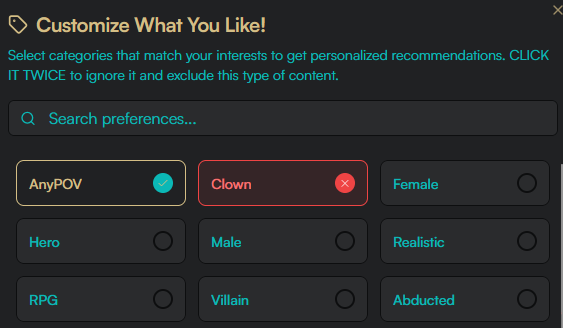
Interest Categories is like an algorithm that'll change the Characters for You and Creators for You on the home page, as well as bots that will appear under Explore, Search, and Surprise Me (Ignore only). These are based off of the Category Tags that are used on bots. If you click it once, you mark it as Interest. If you click it twice, you mark it as Ignore.
Ignored Creators hides specific creators from the site for you. This also applies to Surprise Me. Please note that this is case sensitive.
## Configure Response Settings
This changes how the models do specific things. There is also a version of this while you are in chat, which \*only\* changes for that specific character.
Length: General length + detail in responses. Best applied together with Style for fine-tuning.
POV: What point of view you want the bot's messages in.
Act: If you want the bot to provide narration or dialogue for you as a user. Please note that if the greeting of the bot provides narration or dialogue for you, it's entirely possible it'll continue to do so even if you have this set to No.
Style: How much narration vs dialogue you want.
Tense: If you want the messages to be in present tense or past tense.
## Model Defaults
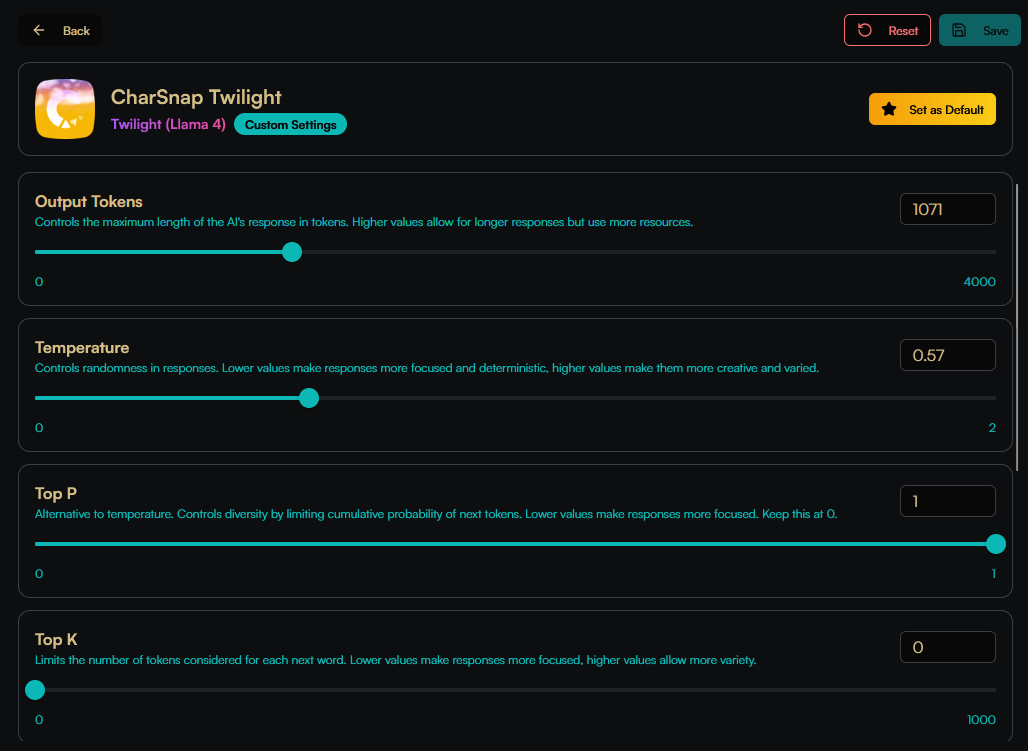
Tired of having to switch all your chats away from CharSnapLLM V2 every time you start one? Now you can set your own default! You're also able to change the default of a model so that you don't have to set it every time you make a new chat. You are able to still change these values within in a specific chat. You can read about what these values do in [Model Settings](/charsnap/basics-for-everyone/chatting/models/model-settings.md).
## Manage Badges
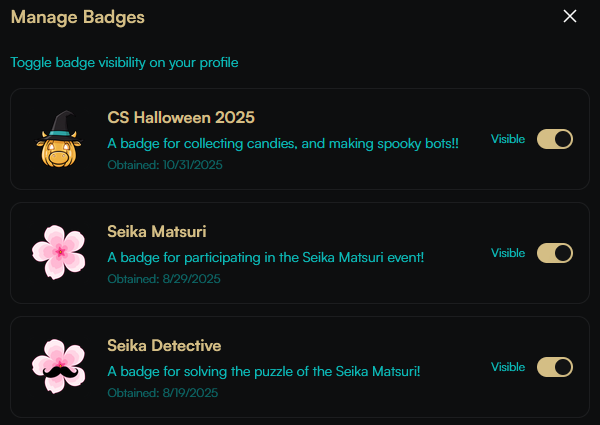
CharSnap has badges for events! By participating in these events or completing certain tasks, you're able to get a badge. This badge appears above your username on your profile.
## Subscription
You can view your plan details as well as navigate to the other plans through here! If you decide to upgrade mid-month, or decide you don't like it and want a refund, you're welcome to make a support ticket on Discord for a prorated refund for the unused time!