# Search

On this page, you can browse through all the characters (or bots, same thing) that have been created on CharSnap. Unlike the home page (where you can browse the most recently made bots at the bottom), it is much easier to scroll through here since you don't have to click a button to load in more bots.

<figure><img src="/files/o8wEidiwmubjN0fGw2le" alt=""><figcaption><p>Main preview of the All Characters Page.</p></figcaption></figure>

<div data-full-width="true"><figure><img src="/files/OMAtvbcQTbvcPZM8iQx0" alt=""><figcaption><p>Filter tags! Helps you find bots that suit your tastes.</p></figcaption></figure></div>

Here, you can click on tags to filter characters—you can select more than one at a time. Scroll to see more tags (please note that tags are primarily user made, meaning that there may be some unsavory tags. If you see any, please report them in the Discord). You can also search for characters by name using the search bar; it looks for relevant information inside the bot too. If NSFW is toggled off, you won’t see bots marked as NSFW. Just note: any bot *can* be NSFW. The toggle just hides ones that are mainly made for that type of content.

<figure><img src="/files/gKPwCZJBrudSlHFIfIVF" alt=""><figcaption><p>Drop down menu filter.</p></figcaption></figure>

You can use the drop down on the top right to change sorting to Popular, Favorites, New, and Oldest. Note that New and Oldest sort by creation date, NOT publication date. Popular is the default setting.

<figure><img src="/files/L3cocLaRWDQnEVQHt5K5" alt=""><figcaption></figcaption></figure>

You can also filter by multiple tags by hitting the three lines next to Reset. Here, you can type in a tag and select it from the Search Results, which adds it into the tag list you're searching for. Please note that you cannot currently filter \*out\* tags this way.

## Searching for Creators

Guess what? You can finally browse and search for your favorite creators! Woohoo! We don't have to find people through a specific bot anymore! Hold on, there's more. Let's just get through the basics first.

<figure><img src="/files/yGQbGTzPa4h59S2ZoxsR" alt=""><figcaption><p>You can search for creators too! (Desktop preview)</p></figcaption></figure>

To search for creators, you simply go to click on the Search tab in the CharSnap sidebar menu (duh). Then, you're going to have to swap the preview from Characters to Creators. See the image above for reference, the red box.

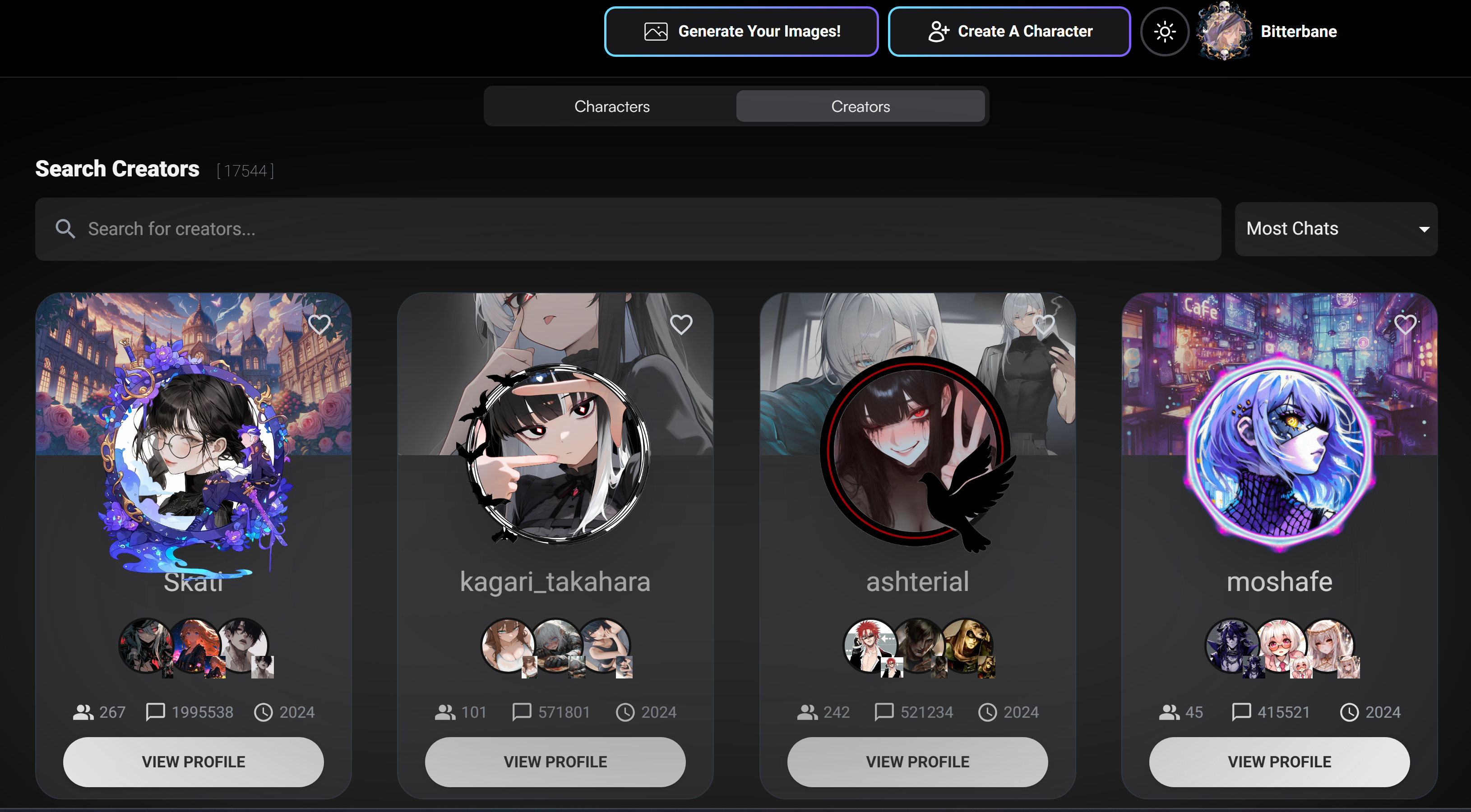
<figure><img src="/files/CWD46YVBd9C5thOENw4o" alt=""><figcaption><p>Default creator search preview (Desktop)</p></figcaption></figure>

In this section of the search, you can search for specific bot/character creators that you'd like to browse. In the search bar, you can type the username of a creator you want to search for, and they should show up on the spot. This way you can quickly find your friends or search for profiles that your friends have recommended!

<figure><img src="/files/Xc3q5KnfFK7d2twJdmW9" alt=""><figcaption><p>Creator search sortment</p></figcaption></figure>

By default, the search menu will show you the creators that have the most chat interactions! If you wish to change that, you can do so in the top right (red box) of the search menu and sort via newest, oldest, or by who has the most characters/bots.

## Favouriting/Following A Creator

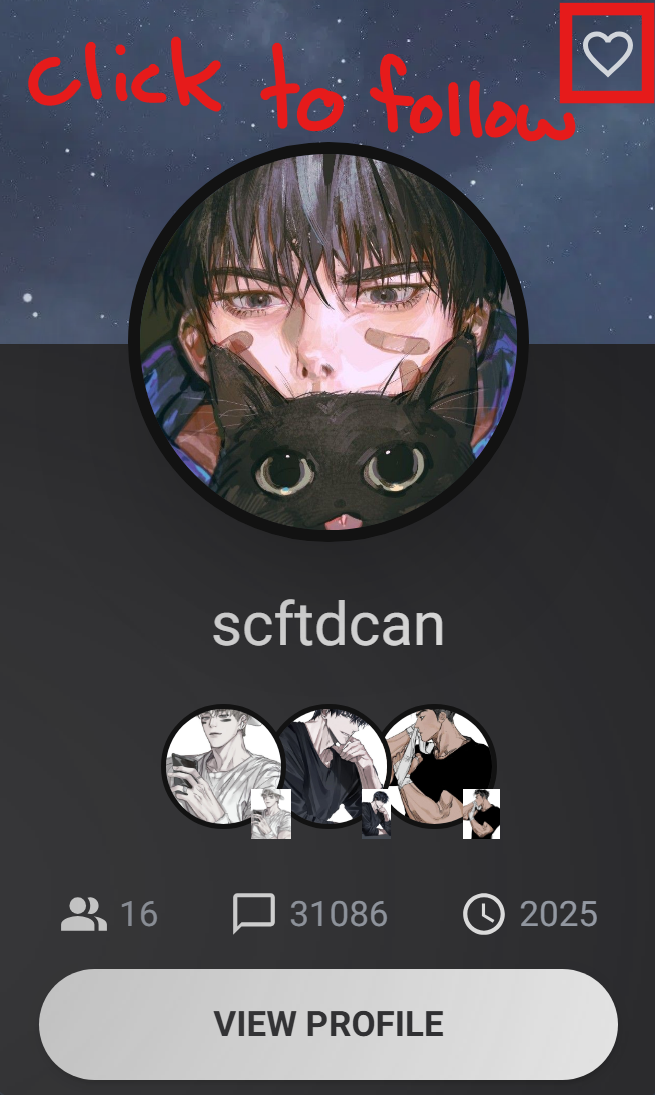
<figure><img src="/files/6HRpOVISyFKqQzwpJhNT" alt="" width="164"><figcaption><p>Following a creator</p></figcaption></figure>

You can follow a creator either through the Search function, or by opening their creator profile (via the creator's page or [Bot Profile](/charsnap/basics-for-everyone/bot-profile.md). To follow a creator, you simply click on the heart in the top right corner of their profile card. This way, you can stay in the loop and see if your person of choice has made any new bot releases!

### How Do I See Who I'm Following?

Wondering where all the people you followed went? They can be found in the same area as [My Favourites](/charsnap/basics-for-everyone/my-favourites.md)! Both, characters you loved and creators you have followed can be seen in this section of CharSnap.

<figure><img src="/files/De7AiUXmmvRI2JJAt91y" alt=""><figcaption><p>Viewing your followed creators in <a data-mention href="/pages/Ujj2DIJiqt9upWlmzOoe">/pages/Ujj2DIJiqt9upWlmzOoe</a></p></figcaption></figure>

Same as the search bar, you can organize your favourites by character or creator at the top of the screen. No need to dive back into the pits to find that missing treasure!  Everything's in safekeeping.


---

# Agent Instructions: Querying This Documentation

If you need additional information that is not directly available in this page, you can query the documentation dynamically by asking a question.

Perform an HTTP GET request on the current page URL with the `ask` query parameter:

```
GET https://charsnap.gitbook.io/charsnap/basics-for-everyone/search.md?ask=<question>
```

The question should be specific, self-contained, and written in natural language.
The response will contain a direct answer to the question and relevant excerpts and sources from the documentation.

Use this mechanism when the answer is not explicitly present in the current page, you need clarification or additional context, or you want to retrieve related documentation sections.