> For the complete documentation index, see [llms.txt](https://charsnap.gitbook.io/charsnap/llms.txt). Markdown versions of documentation pages are available by appending `.md` to page URLs; this page is available as [Markdown](https://charsnap.gitbook.io/charsnap/tips/markdown-guide.md).
# Markdown Guide
Formatting your text while making a bot or during an ongoing roleplay!
Let's keep thing straight. You wanna know how to format the text in chat? Let me show you.
### Different Types of Markdown Formatting
Make sure to use these characters on both sides of the text! For example: \ \*if you want to italicize your text, you add these asterisks at the front and end.\*
`*` | italicizes like *this.*\
`"` | Colors and highlights your dialogue inside quotations.\
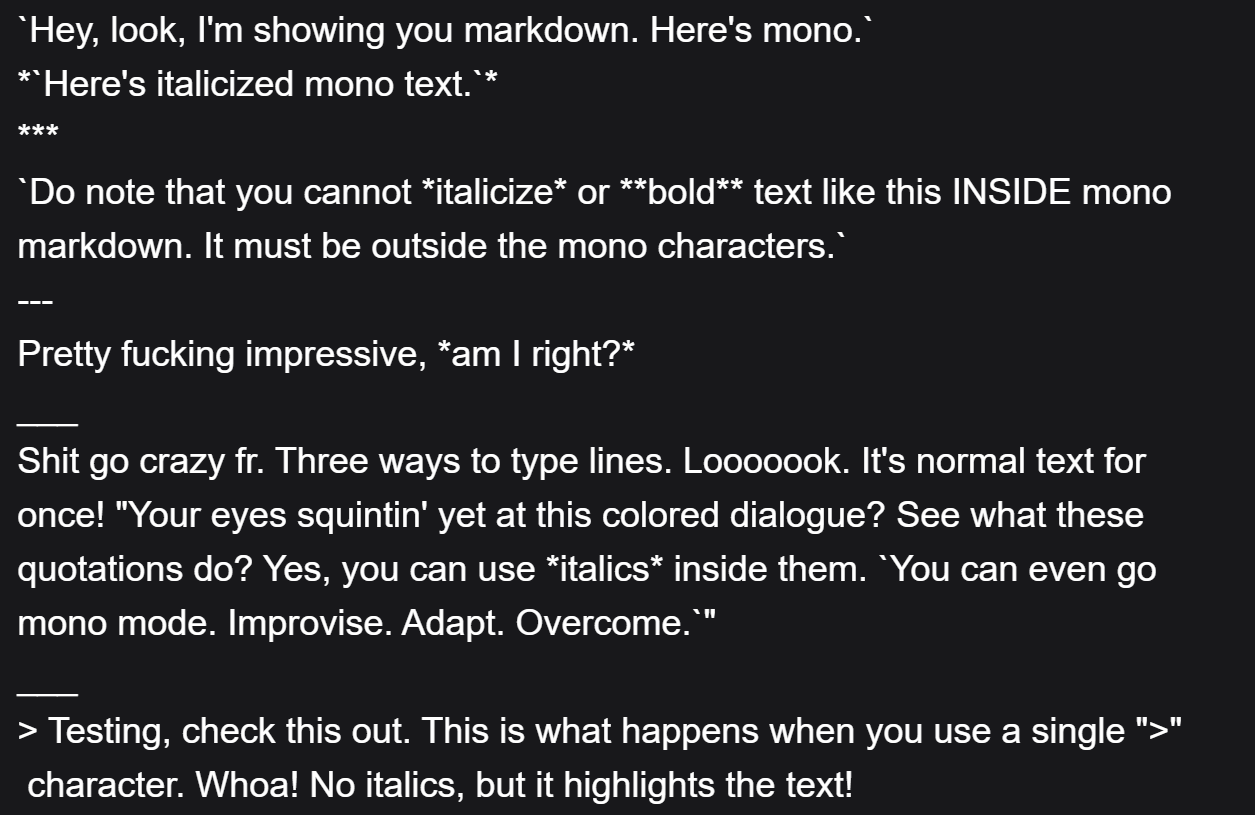
`` ` `` | mono font (can be combined with italics). You can ONLY apply italics with the mono font *when* it it is outside the asterisks. A visual example will be shown in a moment.\
`_` | also acts like `*` just another way to do italics.\
`-` | acts as a bullet point.\
`***`, and `___` | are separator lines for text above and below.\
`#` | Use hashtags to create headers. There's three different sizes. `#` One hashtag is the largest. `##` Two hashtags is a slightly less bigger one. `###` Three hashtags is the least big one.\
`>` | acts like `*` but ignores backspaces between paragraphs, and does NOT italicize the text. DO NOT repeat this character at the end of the text, only use one in front of the text if you want to use it. Like this: > Just do this, don't repeat the ">" at the end.\
` ` | acts as a giant and fat linebreak, basically.\
`[insert visible text](#- "insert invisible text")` | Essentially, you are able to hide part of your message from the bot. This is more of a visual effect as your *hidden* text will still be visible to the bot.\
`` | This allows you to insert an image into THE FIRST MESSAGE or Creator Memo of the bot. The same creator rules apply in which that the pictures must be appropriate, and if any, have characters that look of-age. Pictures may be explicit NSFW as long as the bot itself is marked as an NSFW profile. Chibis in the Memo are acceptable as long as they are sfw and clearly chibi and not just a child.\
`>>Insert Text Here<<` | These characters will allow you to apply a spoiler bar / hide text. This can be used in any written field on CharSnap (bot guts, creator memos, anywhere you can write). The AI will still read your messages the same even with the spoiler bar over it. The effect of this markdown is entirely visual only. Perhaps you can use it to blur out your OOC commands for more immersion.\
`@[username]:{Words}[id]:{insert user profile ID}` | This essentially "tags" a user by providing a clickable link to their profile, which is great for gifts and collaborations. The 'username' part MUST stay 'username', do not change that!! The part the says 'Words' can be changed to anything, and will be what the link says. The long bit is the user's ID, which you pull from their profile.\
` I am collapsible! Hide me! ` | This lets you create a collapsible list (example image will be provided below. You're able to preview and hide text as you wish with the click of a button. Inside the brackets, title your list whatever you want and put your bullet points in between the variables. Like this: \ I titled my list, that's cool! \\
`~~Strike you're out.~~` | If you want to cross out your text like this, add double squiggly lines on both sides of your sentence.
`[](external link)` | Image that also works as a link.
And before you ask: You can bold text, but it will **only** work in the Creator Memo, Bot Description, and Bot Personality fields (for viewing). At least, that is the case on most devices. Otherwise `**` will not work in RP (in-chat) text. Sorry! Otherwise, see the pictures below if you need a visual on how to format the text. Do note that Markdown can be used *both* during in-chat conversations and in character creation.
The layout. Visual example of how to use markdown.
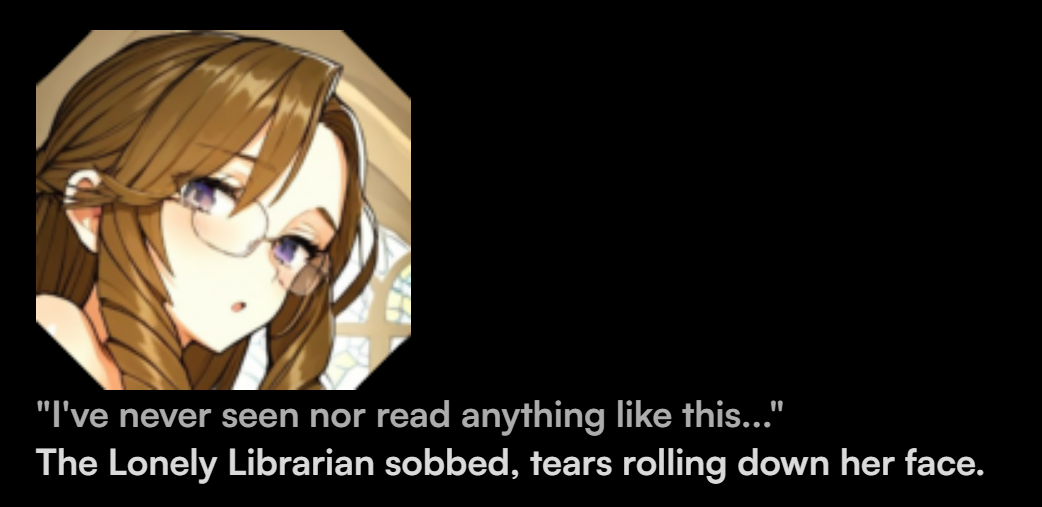
The result.
DO NOTE that mono font characters *cannot* transfer to another line entirely. Symbols are separated. If you need a better grasp on what that looks like, see the picture below. The D from "Don't" got separated from the rest of the text, because mono text reads messages as separate symbols. Hope that makes more sense!
Mono font text (2nd line) breaking off at the end.
Examples of [insert visible text](#- "insert invisible text") :
As soon as the message goes through, you are can hover over your sent-message and see the hidden text become visible in a separate box. Pretty cool! If there are any other types of markdown formatting you happen to discover, but you don't see it here on the wiki, let us know on the Discord!
Examples of 
Example layout of image markdown text.
Result of image markdown text.
Headers, Strikethroughs, Tagging Users, Collapsible List, and Spoiler Markdown